FAQ
Frequently asked questions
Here are the different ways owners can pay their dues and fees with PayHOA:
-
Owners can pay electronically using their online banking credentials (instructions link)
-
Owners can pay electronically using their bank routing and account numbers (instructions link)
-
Owners can mail a check to the PayHOA lockbox at the address below. Please include your unit # in the memo field of the check. PayHOA will receive the check and deposit into our account.
Sundance HOA
P.O. Box 94046
Las Vegas, Nevada 89193-4046 -
Owners can pay electronically using a credit card. Note that using a credit card will incur a 2.9% + 30 cent processing fee that the owner will pay for using this method. (instructions link)
Owners can also setup their dues to be auto-paid.
- Here are the steps to enroll in autopay: https://intercom.help/payhoa/en/articles/3443937-how-to-enroll-in-autopay
- Here are the steps to turn off/disable autopay: https://intercom.help/payhoa/en/articles/5857835-how-to-disable-autopay
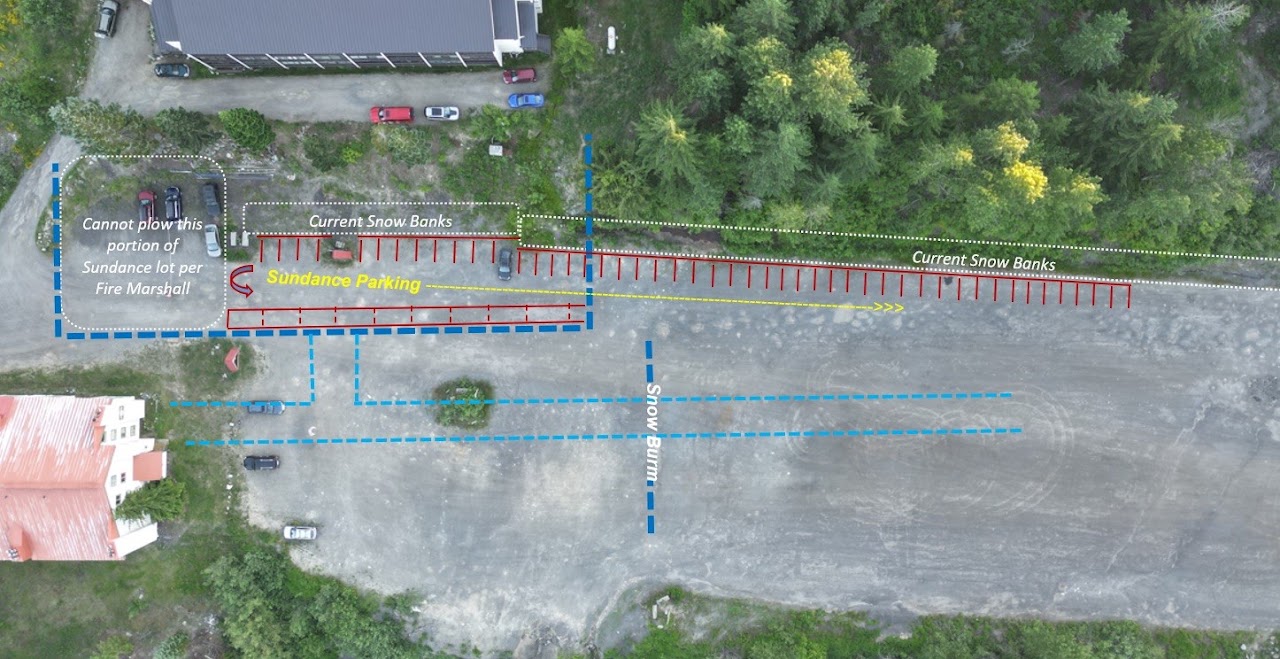
Since much of our easement is inaccessible in the winter, the Summit has agreed to allow Sundance-only parking for an additional 20 spots along the snowbank to the end of the tall trees. We are also allowed to parallel park to create a 2nd row, per our easement. See photo below with new Sundance parking noted in red.
-
1 car per unit is allowed in the Sundance parking area. Additional cars can be parked in the main lot.
-
Display your parking pass at all times.
-
Move your car into the main lot outside the berm on Thursday nights for plowing.
-
Do not park in Suncrest’s parking spots.
-
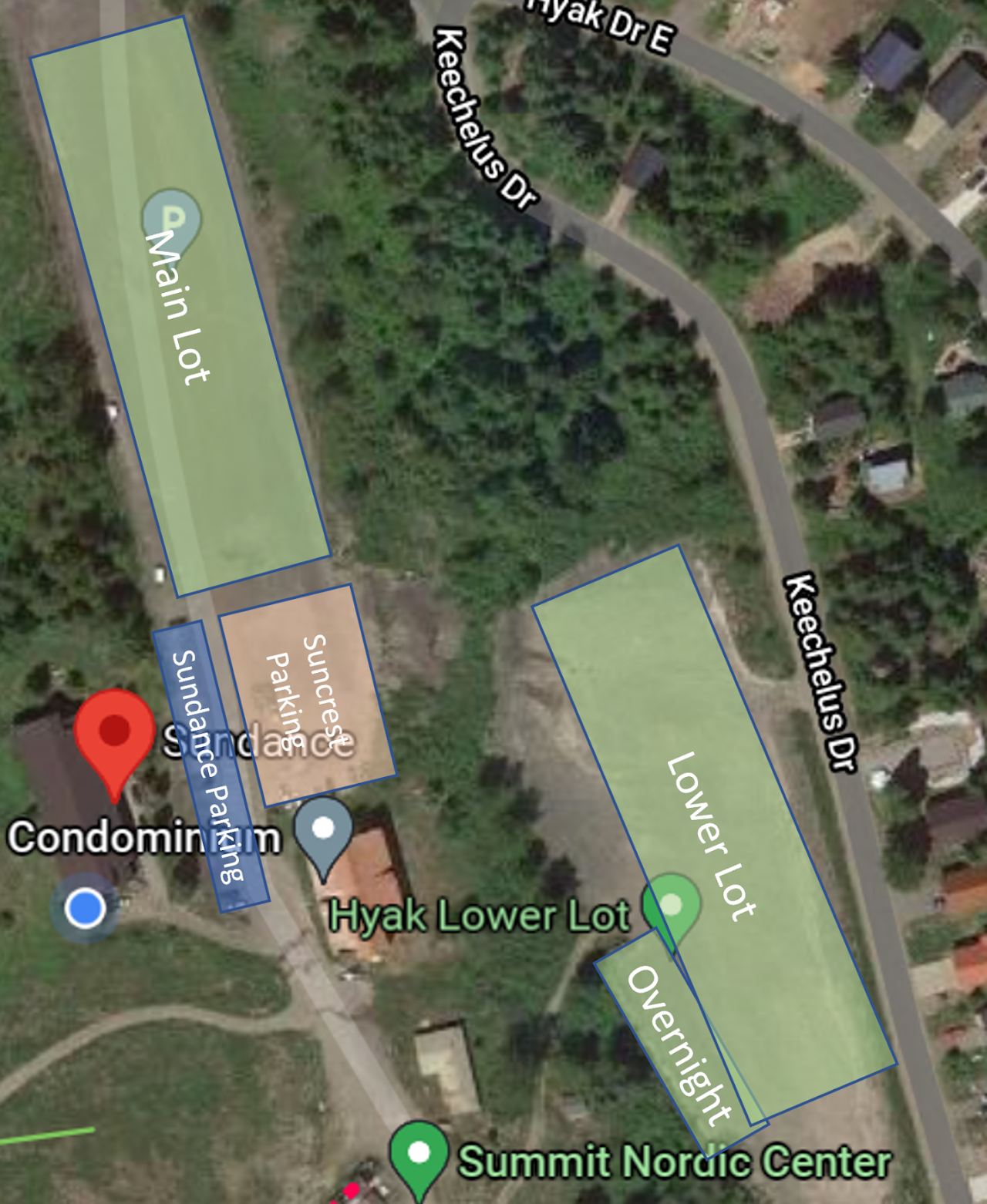
If parking is full in Sundance parking, park in the main, lower, or overnight lots.
Summer / Fall parking
Parking in the Summer and Fall is easy.
-
The lot has plenty of spots.
-
You may also park 1 car per unit in the upper area on the south and east sides of the building. When parked in the upper area, you must display your parking pass at all times. This helps other owners identify in your car, in case someone needs to request it be moved for a delivery or other temporary reason.
Sundance HOA has established the order form below for lenders, closing agents, or real estate agents to order project data, financial reports, or governing documents as may be needed for unit sales, refinancing, etc.
Sundance uses a site called PayHOA to manage our association. PayHOA is used by members to pay their membership dues, see their payment history, and make requests of the association (for building maintenance, etc).
If you are already registered with PayHOA for access to our Sundance account you can login here: https://app.payhoa.com/auth/login
If you do not already have a PayHOA account with Sundance, you can join by clicking here: https://app.payhoa.com/auth/join/14521-sundance-hoa
You can a 5 minute video tour of PayHOA here: https://intercom.help/payhoa/en/articles/3159345-homeowner-experience-video
There are help articles for using PayHOA here: https://intercom.help/payhoa/en/collections/1767520-homeowner-how-to-articles
-
Download the app here: https://www.app.payrange.com/
-
Create an account in the app to get your first wash FREE.
-
In the laundry room, select the cycle you want to use on the washer or dryer. You will see the price of the cycle.
-
In the app, select the machine you are using based on the machine number (see the big sticker on the front of it).
-
Select the cycle/cost you want to run
-
For Washers, you can select a regular, deluxe, or ultra cycle. Alternatively, you can also add $0.25 (for example, if you selected a regular cycle but wanted to buy up to the deluxe cycle).
-
For Dryers, you can start by paying for a $0.50 (30 min), $0.75 (45 min), or $1.00 (60 min) drying cycle. Once the dryer is running, you can add an additional 15 minutes for $0.25 by clicking the 1 Add'l Minutes option.
-
-
Voila - The payment will show up on the machine you chose for you to run your laundry cycle.
-
A timer will show the amount of time left in your cycle and the app will notify you when your laundry cycle is complete.
-
You can also click on My Laundry Rooms in the app to see the availability of Washers and Dryers. No more showing up with dirty laundry just to find all the machines are taken!
For additional information on using our PayRange laundry solution or for opening a support ticket with PayRange, see the resources here: https://www.app.payrange.com/support. There is also a Youtube playlist of videos to help you out here: https://www.youtube.com/watch?v=2hP2ZQEqrLs&list=PLBKOJInnqECxbfbYFgXYdtFHg-zsGM1Hw.
-
Washington State Laws: https://app.leg.wa.gov/rcw/default.aspx?cite=64.38&full=true
-
Various links from Homeowners Protection Bureau: https://www.hopb.co/washington
-
Sundance business registration (search for "Sundance Homeowners Association" with address at 223 E HYAK DR, SNOQUALMIE PASS, WA, 98068, UNITED STATES here: https://ccfs.sos.wa.gov/#/BusinessSearch (UBI 602 471 283)
What Community Amenities are Available?
601 Sundancers Chalet
Every day 1 PM to 3 PM
Book